The Problem Most Dental Practices Refuse to Quantify
A consultant led a consultation. The patient sat across the desk, received a full treatment plan, heard the numbers — and left without booking. Maybe they needed to think. Maybe the cost surprised them. Maybe life just got in the way.
Three weeks later, that patient is still on a printed spreadsheet somewhere. Nobody has followed up. The practice management software exported a CSV on Monday. It is sitting in someone's inbox. There is no system, no trigger, no automation. The revenue from that consultation leaked the moment the patient walked out the door.
This is not a one-off problem. For the boutique Cambridgeshire dental practice that came to us, it was the defining operational gap. They had strong clinical outcomes, high consultation volume, and a serious percentage of open treatment plans that were simply never activated. Patients who had already raised their hand — sat through a consultation, received a plan — were falling into silence because no follow-up infrastructure existed.
The brief was specific: build a complete patient follow-up automation system from zero. No existing CRM to inherit. No legacy database to migrate. Full architectural freedom. A detailed nine-page functional specification waiting to be executed.
"This is not a beginner role. We need someone who has shipped complex, revenue-generating funnels. You must be comfortable with conditional branching, webhooks, and API integrations."
The hard part was not writing code. The hard part was engineering a system that a non-technical practice team could operate forever — adding new workflows without touching configuration, editing message templates through a UI, and waking up every morning to a dashboard that showed them exactly what needed attention.
Architecture Overview: How We Thought About This Before Writing a Single Line
Most automation projects fail at the design phase — not because the tools are wrong, but because the state model is wrong. Before selecting any platform, we mapped the system as a state machine. A patient is always in one of a defined set of states, and every event transitions them from one to the next. That constraint keeps the system predictable, auditable, and impossible to put into a loop.
PATIENT STATE MACHINE
══════════════════════════════════════════════════════════════

  [NEW ENTRY]
      │
      ├─── Manual Form ──────────────────────────────────────┐
      │                                                      │
      └─── CSV Import (Weekly Bulk) ──────────────────────► │
                                                         [DEDUP ENGINE]
                                                             │
                           ┌───────────────┬─────────────────┴──┬────────────────┐
                           │               │                     │                 │
                     [OPT-OUT?]     [DUPLICATE?]          [NEW PATIENT]   [WORKFLOW ACTIVE?]
                     → Block         → Skip                → Enrol         → Skip
                     Permanently                           → Workflow
                           │
                    ┌──────┴──────────────────────────────────────────────────────┐
                    │               ACTIVE WORKFLOW ENGINE                        │
                    │   WF_1 (30–45d)  WF_2 (30–45d)  WF_3  ...  WF_N           │
                    │       [TIMED DISPATCH: SMS + EMAIL SEQUENCES]               │
                    └──────────────────┬──────────────────────────────────────────┘
                                       │
                        ┌──────────────┴────────────────┐
                        │                               │
                  [PATIENT REPLIES?]           [SEQUENCE COMPLETES]
                  → Halt sequence              → Mark complete
                  → Flag for human             → Audit log updated
                  → Log reply                  → Dashboard updated
                        │
                  [STOP REPLY?]
                  → Permanent opt-out
                  → Block ALL workflows
                  → No override, ever
With the state machine clear, the tool selection became obvious rather than opinionated.
| System Layer | Tool Selected | Rationale |
|---|---|---|
| Orchestration | n8n (self-hosted) | Full control over async execution, custom JavaScript nodes, and webhook receivers with zero per-execution cost at this volume. |
| Database / CRM | Airtable | Non-technical staff can view and edit records without touching configuration. Solid API for programmatic reads and writes. |
| Two-Way SMS (UK) | Twilio Messaging | UK long code numbers, inbound webhook support, delivery status callbacks, and carrier-level STOP keyword handling built in. |
| Email Delivery | Resend | Developer-first API, high deliverability, clean webhook events for open and bounce tracking. |
| AI Personalisation | Claude API (Anthropic) | Deterministic, low-hallucination output. Excellent at rewriting short-form clinical communications in a warm but professional register without introducing clinical claims. |
| Dashboard | Airtable Interface Designer | Zero additional infrastructure. The same Airtable base surfaces a filtered, role-scoped interface for the daily morning review. Works on mobile. |
Entry Layer: Two Paths Into the System
The system accepts patients through two distinct entry mechanisms. One handles real-time edge cases. The other handles operational scale.
Manual Entry Form
The practice team occasionally needs to add a single patient immediately — a walk-in who almost committed, a referral who needs follow-up before the weekly export runs. For this, we built a lightweight form backed directly by an n8n webhook.
The form collects the minimum data required to enrol a patient: full name, normalised phone number (E.164 formatted), email, treatment type, consultation date, and the workflow to enter. On submit, the webhook fires synchronously. The dedup check, opt-out verification, and enrolment happen in under two seconds. The form lives as an Airtable form view. The practice coordinator bookmarks it on their phone.
CSV Bulk Import with AI Column Mapping
The practice management software exports patient data as a CSV every Monday. The problem: these exports are inconsistent. Column names change between software versions. Staff sometimes rearrange columns. The order is never guaranteed.
The traditional solution is a rigid column-mapping configuration that breaks the moment the export format shifts. We rejected that entirely. Instead, we built an AI-assisted column mapper that runs on every upload:
- The CSV is uploaded to a secure n8n webhook endpoint.
- n8n reads the header row and the first five data rows of the file.
- This sample is passed to the Claude API with a structured prompt that maps headers to our canonical field schema.
- Claude returns a JSON mapping object — e.g.
{"Patient Name": "full_name", "Mobile": "phone", "Email Address": "email"} - n8n applies the mapping to process every row in the CSV using the dynamically resolved column names.
// n8n Function Node — Claude Column Mapping Prompt

const headerRow = $input.first().json.headers;
// e.g. ["Patient Name","Mobile","Email Address","Consult Date","Tx Type"]

const prompt = `
You are a data normalisation assistant for a dental practice CRM.

Map each of these CSV headers to one canonical field name (or null if no match):
Canonical fields: full_name | phone | email | consultation_date | treatment_type | notes

Headers: ${JSON.stringify(headerRow)}

Return ONLY a valid JSON object. No explanation. No markdown fences.
Example: {"Patient Name": "full_name", "Mobile No": "phone", "Email": "email"}
`.trim();

const response = await fetch("https://api.anthropic.com/v1/messages", {
  method: "POST",
  headers: {
    "x-api-key": process.env.ANTHROPIC_API_KEY,
    "anthropic-version": "2023-06-01",
    "content-type": "application/json"
  },
  body: JSON.stringify({
    model: "claude-sonnet-4-20250514",
    max_tokens: 400,
    messages: [{ role: "user", content: prompt }]
  })
});

const data = await response.json();
const mapping = JSON.parse(data.content[0].text.trim());

return [{ json: { mapping, headers: headerRow } }];
The result is a system that handles column reordering, renamed headers, and even column additions without any manual reconfiguration. Staff upload the CSV. The system figures out the rest.
Deduplication and the Opt-Out Enforcement Layer
This is the most critical compliance component of the entire system. Get it wrong and you are exposing the practice to ICO enforcement, patient complaints, and potential fines under UK GDPR. We built it to be mechanically impossible to bypass.
Phone Number Normalisation
Before any deduplication check, every phone number entering the system is normalised to E.164 format: international dialling code, no spaces, no dashes, no parentheses. 07700 900123 becomes +447700900123. This is the dedup key. Not name. Not email. The phone number, normalised.
Why phone number as the primary key? Because the same patient may be entered as "Sarah J. Mitchell" and "S Mitchell" in different exports. The email may differ between personal and work accounts. The normalised phone number is the single source of identity truth for SMS-based follow-up.
// Phone normalisation — runs on every patient entry (n8n Function Node)

function normalisePhone(raw) {
  let cleaned = raw.replace(/\D/g, ''); // Strip all non-digit characters

  if (cleaned.startsWith('07') && cleaned.length === 11) {
    return '+44' + cleaned.substring(1); // UK mobile: 07xxx → +447xxx
  }
  if (cleaned.startsWith('44') && cleaned.length === 12) {
    return '+' + cleaned;               // Already has country code, add +
  }
  if (cleaned.startsWith('447') && cleaned.length === 12) {
    return '+' + cleaned;               // E.164 without the +
  }
  return '+' + cleaned;                 // Fallback
}

const phone = normalisePhone($input.first().json.raw_phone);
return [{ json: { normalised_phone: phone } }];
The Three-Gate Deduplication Check
Every patient entering the system passes through three sequential gates before enrolment:
OptOuts table by normalised phone. If found: permanent block. Skip remaining gates. Log skipped reason. End.Enrolments table: does this phone + workflow_id combination already have a status of active? If yes: skip. The same patient cannot run the same sequence twice simultaneously.Patients and Enrolments. Set next_send_at to the first step timestamp. Write to audit log.The Opt-Out Is Permanent. That Is Not Negotiable.
When a patient replies STOP — to any message, in any workflow, at any time — two things happen simultaneously:
- Their normalised phone number is written to the
OptOutstable with a UTC timestamp and source workflow reference. - All active enrolment records for that phone number have their status set to
opted_out. No future sequences will trigger.
There is no override. There is no admin toggle. There is no "bypass for re-consent". The system does not allow it architecturally — the opt-out check is the first gate, and a positive result terminates the flow completely before any other logic runs.
GDPR Article 21 gives individuals the right to object to processing for direct marketing purposes, and that objection must be respected permanently and immediately. This is not a compliance checkbox. It is enforced at the data layer. Every outbound SMS includes STOP instructions. Every email includes an unsubscribe link. Both channels share a single opt-out state.
The Six Follow-Up Workflows: Architecture and Sequencing Logic
The practice serves patients across multiple treatment categories. Patients who did not commit to cosmetic treatment need a different conversation than patients who have an open orthodontic plan. Each workflow is its own self-contained sequence — same dispatch engine, different templates, different cadence, different logic.
The key architectural decision: workflows are stored as configuration in Airtable, not hardcoded logic in n8n. The orchestrator reads the workflow definition at runtime. This is what allows new workflows to be added without any code change.
WORKFLOW CONFIG SCHEMA (Airtable)
══════════════════════════════════════════════════════════════

TABLE: Workflows
  workflow_id     → "WF_COSMETIC_01"
  name            → "Cosmetic Consultation No-Commit"
  duration_days   → 42
  active          → TRUE

TABLE: WorkflowSteps  (one workflow → many steps)
  step_id         → "WF_COSMETIC_01_STEP_1"
  workflow_id     → "WF_COSMETIC_01"
  step_number     → 1
  send_after_days → 3        ← days from enrolment date
  channel         → "sms"    ← or "email"
  template_id     → "TPL_COSMETIC_SMS_01"

  step_id         → "WF_COSMETIC_01_STEP_2"
  workflow_id     → "WF_COSMETIC_01"
  step_number     → 2
  send_after_days → 10
  channel         → "email"
  template_id     → "TPL_COSMETIC_EMAIL_01"

  [... continues for all steps in workflow ...]

TO ADD A NEW WORKFLOW:
  → Create one row in Workflows table
  → Create step rows in WorkflowSteps table
  → Set active = TRUE
  → Dispatch engine picks it up on next scheduled run
  → Zero code changes required
A representative workflow cadence — timings and channels vary by treatment type and clinical urgency:
| Day | Channel | Message Type | Objective |
|---|---|---|---|
| Day 3 | SMS | Warm re-introduction | Re-establish context from consultation. Low friction. No hard ask. |
| Day 7 | Treatment overview + FAQ | Address common objections — cost, time, pain — in the patient's own terms. | |
| Day 14 | SMS | Social proof signal | Patient story reference. Creates trust without clinical claim. |
| Day 21 | Availability nudge | Introduce booking incentive or show upcoming appointment slots. | |
| Day 30 | SMS | Direct booking invitation | Clear CTA. One click to book. This is the conversion message. |
| Day 40 | Final check-in | Low-pressure close. Acknowledge they may have moved forward elsewhere. Leave the door open. |
The Dispatch Engine: How Messages Get Sent on Schedule
The dispatch engine is an n8n workflow that runs on a scheduled trigger — every 15 minutes during UK business hours (8am–8pm), hourly overnight. Each execution performs the same set of operations:
- Query Airtable for all Enrolment records where
status = "active"andnext_send_at <= NOW(). - For each due record: fetch the patient record, the next step definition, and the template from Airtable.
- AI personalisation: pass the template and patient variables to Claude API for a personalised rewrite.
- Send: dispatch via Twilio (SMS) or Resend (email) based on the step channel.
- Audit log: write the send event — message SID, patient ID, workflow step, timestamp, delivery status — to the
AuditLogtable. - Advance the enrolment: update
next_send_atto the next step's timestamp, or setstatus = "completed"if the sequence is finished.
The engine is stateless. It holds no patient state in memory. Every execution reads from and writes back to Airtable. It can be restarted, rescheduled, or migrated without data loss — and it survives server restarts without losing track of where any patient is in their sequence.
AI Personalisation: Why Generic Templates Kill Response Rates
Template messages are a trust problem. A patient who attended a consultation for Invisalign does not want to receive a message that reads like it was written for the entire mailing list. The moment a follow-up feels broadcast, it gets ignored — or worse, it generates a STOP reply.
Personalisation at scale used to require either a large team or a very rigid mail merge system. We replaced both with Claude API.
The Personalisation Prompt Architecture
Each template stored in Airtable contains two things: a base message with placeholder variables, and a personalisation instruction. The Claude API call receives both:
// Personalisation API call (n8n HTTP Request Node)

const template = {
  base_message:
    "Hi , it was great to meet you on  " +
    "to discuss . We wanted to follow up and see if " +
    "you had any questions about your treatment plan. We're here to help.",

  personalisation_instructions:
    "Rewrite this SMS message to feel warm, personal, and professional — " +
    "like a message from a caring dental professional, not a marketing " +
    "department. Keep it under 160 characters. Do not mention pricing. " +
    "Do not use exclamation marks. Maintain the key information but make " +
    "it feel individually written. Return only the final message text."
};

const patient = {
  first_name: "Sarah",
  consult_date: "14th May",
  treatment_type: "Invisalign clear aligners"
};

// Fill template variables
let filled = template.base_message
  .replace("", patient.first_name)
  .replace("", patient.consult_date)
  .replace("", patient.treatment_type);

const prompt = `${template.personalisation_instructions}\n\nOriginal:\n${filled}`;

// Claude returns:
// "Hi Sarah, it was lovely meeting you on the 14th to chat through your
//  Invisalign options. Do you have any questions about the next steps?
//  We're here whenever you're ready. To stop messages, reply STOP."
Claude rewrites the template — it does not generate free-form clinical content. The base template is written by the practice team. The AI improves naturalness and tone. It cannot introduce pricing information, clinical claims, or content outside the original template's scope. The practice stays in full control of clinical accuracy. The AI eliminates robotic copy.
Inbound Reply Handler: Two-Way SMS Is the Whole Point
A one-way SMS follow-up system is a broadcast tool. It is not a patient communication system. The moment a practice sends messages they cannot receive replies to, they have created a compliance risk and a patient experience failure simultaneously.
Every outbound SMS is sent from a Twilio UK long code number registered to the practice. When a patient replies, Twilio fires a webhook to our n8n reply handler endpoint within milliseconds.
INBOUND SMS RECEIVED
         │
         ▼
  [Parse Twilio Webhook Payload]
  Extract: From (normalised), Body, MessageSid, Timestamp
         │
         ▼
  [Body === "STOP"?] ─── YES ──► Write to OptOuts table
         │                        Set all active enrolments → opted_out
         │ NO                     Log to AuditLog
         │                        Send GDPR confirmation SMS
         ▼
  [Lookup Patient by normalised phone]
         │
         ├── Not found ──► Log unknown sender. No further action.
         │
         ▼
  [Set enrolment status → "human_required"]
  [Write reply content to PatientReplies table]
  [Set flagged_for_review = TRUE on patient record]
  [Write to AuditLog: event_type = "inbound_reply"]
         │
         ▼
  [Dashboard auto-surfaces reply in morning queue]
The reply handler does not attempt to auto-respond to non-STOP messages. That would require clinical judgement the system is not equipped to make. Instead, it surfaces the reply in the dashboard for a human to action — and it stops all automated messages immediately, so the patient is not receiving another scheduled SMS while someone is composing a reply.
The Full Audit Trail: Every Message, Every Status, Forever
Healthcare communication carries regulatory weight. The ICO expects organisations to be able to demonstrate exactly what was sent to whom and when. The audit log makes compliance reporting a ten-second operation.
Every event in the system writes a record to the AuditLog Airtable table:
| Field | Type | Description |
|---|---|---|
event_type |
Single select | sms_sent · email_sent · inbound_reply · opt_out · enrolment · dedup_skip · error |
patient_id |
Linked record | Reference to Patients table |
workflow_id |
Text | Workflow identifier at time of event |
step_number |
Number | Step within the workflow sequence |
channel |
Single select | sms · email · system |
message_sid |
Text | Twilio MessageSID or Resend email ID |
delivery_status |
Single select | queued · sent · delivered · failed · undelivered |
event_timestamp |
DateTime (UTC) | Precise timestamp of event |
notes |
Long text | Error messages, skip reasons, anonymised reply content |
Twilio delivery status webhooks update the delivery_status field asynchronously — so the audit log does not just record that a message was sent, it records whether it actually reached the patient's handset.
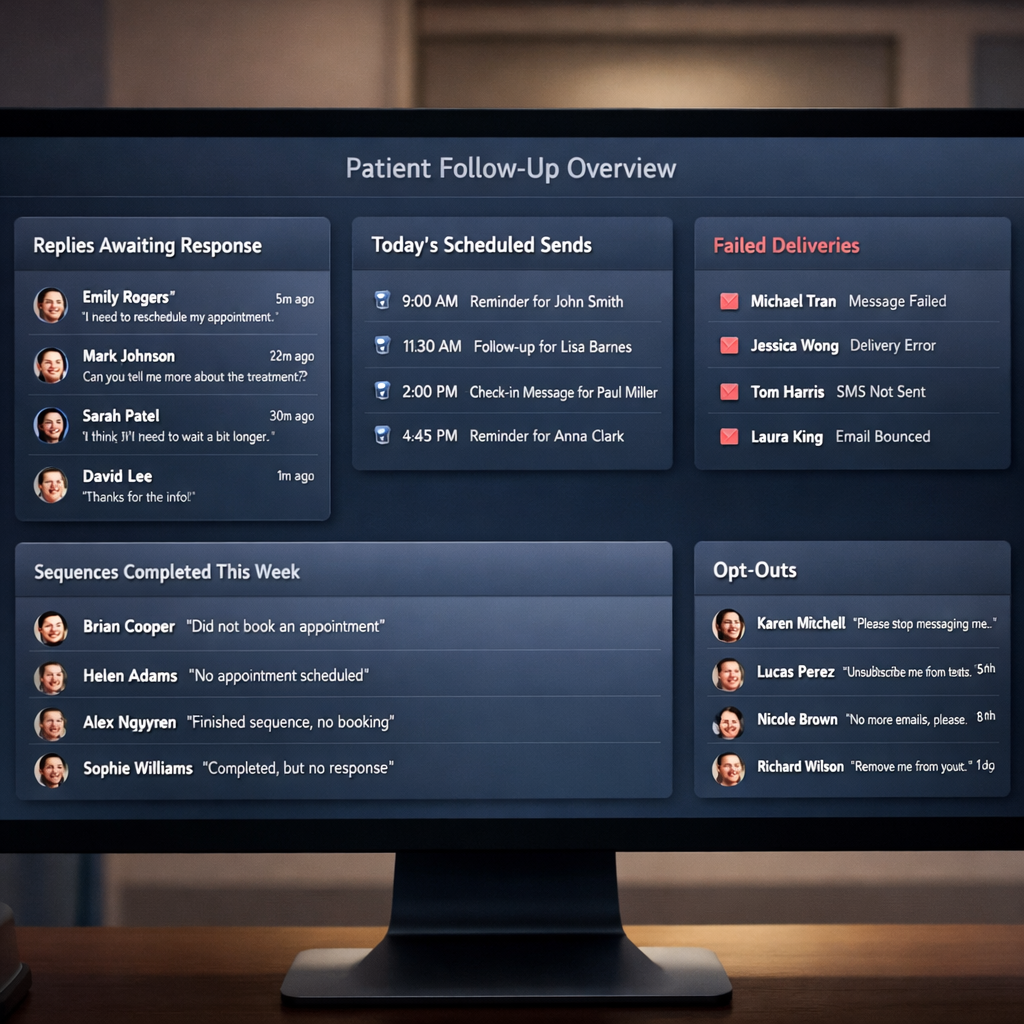
The Daily Operations Dashboard: Sixty Seconds Each Morning
The practice coordinator opens the dashboard at 8:30am. In sixty seconds, they see everything that needs attention. Not a spreadsheet. Not a report to generate. A live, filtered view.
The dashboard is built using Airtable Interface Designer — no additional infrastructure, no separate web app, nothing to maintain. It uses the same Airtable base as the automation engine, surfacing filtered views with role-appropriate permissions. Works on mobile.
Database Architecture: The Airtable Schema That Makes It All Work
Airtable is the patient CRM, the workflow configuration store, the opt-out registry, the audit log, and the dashboard data source simultaneously. For this to work without becoming a maintenance nightmare, the schema must be clean and normalised from day one.
AIRTABLE BASE — FULL RELATIONAL SCHEMA
══════════════════════════════════════════════════════════════

TABLE: Patients
  patient_id (Autonumber, Primary)  full_name (Text)
  normalised_phone (Text, Unique)   email (Email)
  created_at (DateTime)              source (manual_form | csv_import)
  [Linked: Enrolments, AuditLog, PatientReplies]

TABLE: Enrolments
  enrolment_id (Autonumber, Primary)
  patient_id → Patients
  workflow_id (Text, references Workflows table)
  enrolled_at (DateTime)             current_step (Number)
  next_send_at (DateTime)
  status (active | completed | opted_out | human_required | paused)

TABLE: Workflows
  workflow_id (Text, Primary)       name (Text)
  duration_days (Number)            active (Checkbox)
  [Linked: WorkflowSteps]

TABLE: WorkflowSteps
  step_id (Autonumber)              workflow_id → Workflows
  step_number (Number)              send_after_days (Number)
  channel (sms | email)              template_id → MessageTemplates

TABLE: MessageTemplates
  template_id (Autonumber)          name (Text)
  base_message (Long Text)          personalisation_instructions (Long Text)
  channel (sms | email)              subject_line (Text, email only)

TABLE: OptOuts
  optout_id (Autonumber)            normalised_phone (Text, Unique)
  opted_out_at (DateTime)            source_workflow (Text)
  source_message_sid (Text)

TABLE: AuditLog
  event_id (Autonumber)              event_type (Single Select)
  patient_id → Patients              workflow_id (Text)
  step_number (Number)               channel (sms | email | system)
  message_sid (Text)                 delivery_status (Single Select)
  event_timestamp (DateTime UTC)    notes (Long Text)

TABLE: PatientReplies
  reply_id (Autonumber)              patient_id → Patients
  reply_body (Long Text)             received_at (DateTime)
  twilio_message_sid (Text)          reviewed (Checkbox)
Handover: Building for People Who Are Not You
This is the part most automation developers get wrong. The system is technically complete. The workflows run. The messages send. The opt-outs work. And then the developer hands it over — and the practice team cannot figure out how to add a new treatment type to an existing workflow.
We built the handover as a deliberate deliverable, not an afterthought. Three components:
Operations Manual — Four Guides in Plain English
A short documentation set covering the four things a non-technical user will ever need to do: how to add a new workflow, how to edit a message template, how to run a CSV import, and how to use the daily dashboard. No technical language. Annotated screenshots. Loom video walkthroughs for each process.
Handover Call with the Practice Team
A live session walking the practice coordinator and practice manager through every dashboard panel, running a live test import with a dummy patient, demonstrating a reply triggering the human review flag, and answering operational questions. The session was recorded and stored in their shared drive.
Incident Response Protocol
What to do if the dispatch engine stops running. What to do if Twilio returns a delivery failure spike. What to do if the Claude API call fails — the fallback is to send the base template without AI personalisation. The team needed to know what fallback behaviour looks like so they are not alarmed when it activates.
Technical Takeaways: What Builders Can Replicate
If you are building a similar system for a healthcare or professional services practice, these are the architectural decisions we would make again without hesitation:
- Phone number as the dedup key, normalised to E.164, always. Name and email are too inconsistent across exports and manual entry. The phone number is the patient identity anchor.
- Store workflow configuration in the database, not in the orchestration tool. n8n workflows should be logic, not content. Templates, cadences, and step definitions belong in a table a non-developer can edit.
- Two-way SMS is not optional in healthcare. Any follow-up system that cannot receive replies is non-compliant with reasonable patient communication standards and creates an unreachable dead-end for patients who need to respond.
- AI personalisation with guardrails outperforms templates without AI. The base template defines what is said — the LLM improves how it is said. Keep clinical content in the template. Let the AI handle tone.
- Opt-out must be architectural, not operational. If opt-out can be bypassed by an admin setting, it will eventually be bypassed. Make the block the first gate in the enrolment flow, not a checkbox in a settings page.
- Build the dashboard for the person who will use it daily, not the developer who built it. If the coordinator needs technical training to review the morning queue, the dashboard has failed.
The Bottom Line
Private dental practices sit on significant unrealised revenue in their open treatment plans. The consultations have already happened. The trust has already been established. The patient has already shown intent. The only thing standing between the practice and a committed booking is a consistent, personalised, and compliant follow-up system.
Building one from scratch is a significant engineering project. But the alternative — continuing to let that revenue leak through manual processes and inconsistent follow-up — costs far more in the long run.
The system we built for this Cambridgeshire practice is fully automated, fully GDPR-compliant, and fully operable by a non-technical team. It will continue running, personalising, and following up without developer intervention — until a patient books, opts out, or the practice adds the next workflow.
That is what automation is supposed to do.