A fintech company managing client accounts, trust documents, tax communications, and funding workflows. An operations team that needs to send the right email at the right moment — triggered by a database flag, a missed action, a fixed tax deadline, or a field update that just came in. And a previous platform, HubSpot, that had failed them on every dimension that actually mattered: transactional email blocked by unsubscribe rules, no attachment support, no repeating logic, and a workflow engine that required engineering involvement every time the ops team needed to change a trigger.
The problem was not that their automation was broken. The problem was that their automation was built on a marketing tool pretending to be an operations system. Those are not the same thing. A marketing tool is designed to send campaigns to audiences. An operations system is designed to respond to individual data events — a specific client's account getting funded, a document flag flipping to true, a deadline passing without a form being submitted. When you try to run operational workflows through a marketing platform, you spend all your time working around the tool's assumptions rather than solving the actual problem.
The brief was to design a fully automated, event-driven email system where the ops team could edit content, modify triggers, and adjust timing without touching engineering. Critical emails would never be blocked by marketing unsubscribe rules. Attachments and secure document links would work. Repeating logic would run until a condition was met or a reply came in. The company is anonymised here. The architecture is not.
When a tax document needs to reach a client, it needs to reach them — regardless of whether they clicked unsubscribe on a newsletter six months ago. Conflating transactional obligations with marketing preferences is not a compliance strategy. It is a liability. The architecture has to separate them from the start. Arsalan Faysal — Revenue Systems Architect
Why HubSpot Failed — Three Hard Walls
HubSpot is an excellent tool for its intended purpose. That purpose is marketing automation — campaign management, lead nurturing, audience segmentation. It is not designed for operational email workflows at a fintech company where the same system that sends a welcome sequence also needs to deliver a tax document to a specific client on a specific date based on a specific database flag.
The client hit three walls that could not be worked around. Each one was a direct consequence of using a marketing platform for operational work.
| Problem | What it meant in practice | Why it could not be fixed inside HubSpot |
|---|---|---|
| Transactional emails blocked by unsubscribe status | A client who had clicked unsubscribe on a marketing email would not receive critical tax communications or onboarding documents. A legal and operational liability masquerading as a deliverability setting. | HubSpot's unsubscribe architecture is designed for marketing compliance. It does not distinguish between "I do not want your newsletter" and "please do not send me my tax documents." That distinction has to live at the system architecture level, not inside a single platform's settings. |
| No attachment support in transactional emails | Trust documents, tax documents, and account reports could not be sent as attachments. Every document delivery required a manual workaround — a process that did not scale and introduced human error into legally sensitive communications. | HubSpot transactional email does not support file attachments. This is a platform constraint, not a configuration issue. It cannot be unlocked. |
| No repeating workflow logic | "Send a reminder every three days until the client funds their account" is a standard operational requirement. HubSpot workflows could not execute it. Every reminder sequence had to be built as a fixed number of individually scheduled emails — brittle, unscalable, and increasingly manual as the client base grew. | HubSpot workflows are designed for linear marketing sequences, not conditional loops. The repeating logic that operational email requires does not exist in the platform's workflow engine. |
The decision to replace HubSpot was not made lightly. The client had invested time in building their existing workflows. But the three walls above were not quirks to work around — they were architectural constraints that made the platform wrong for this use case at a fundamental level. The right answer was not a better HubSpot configuration. It was a different system designed for a different job.
The Core Architecture Decision
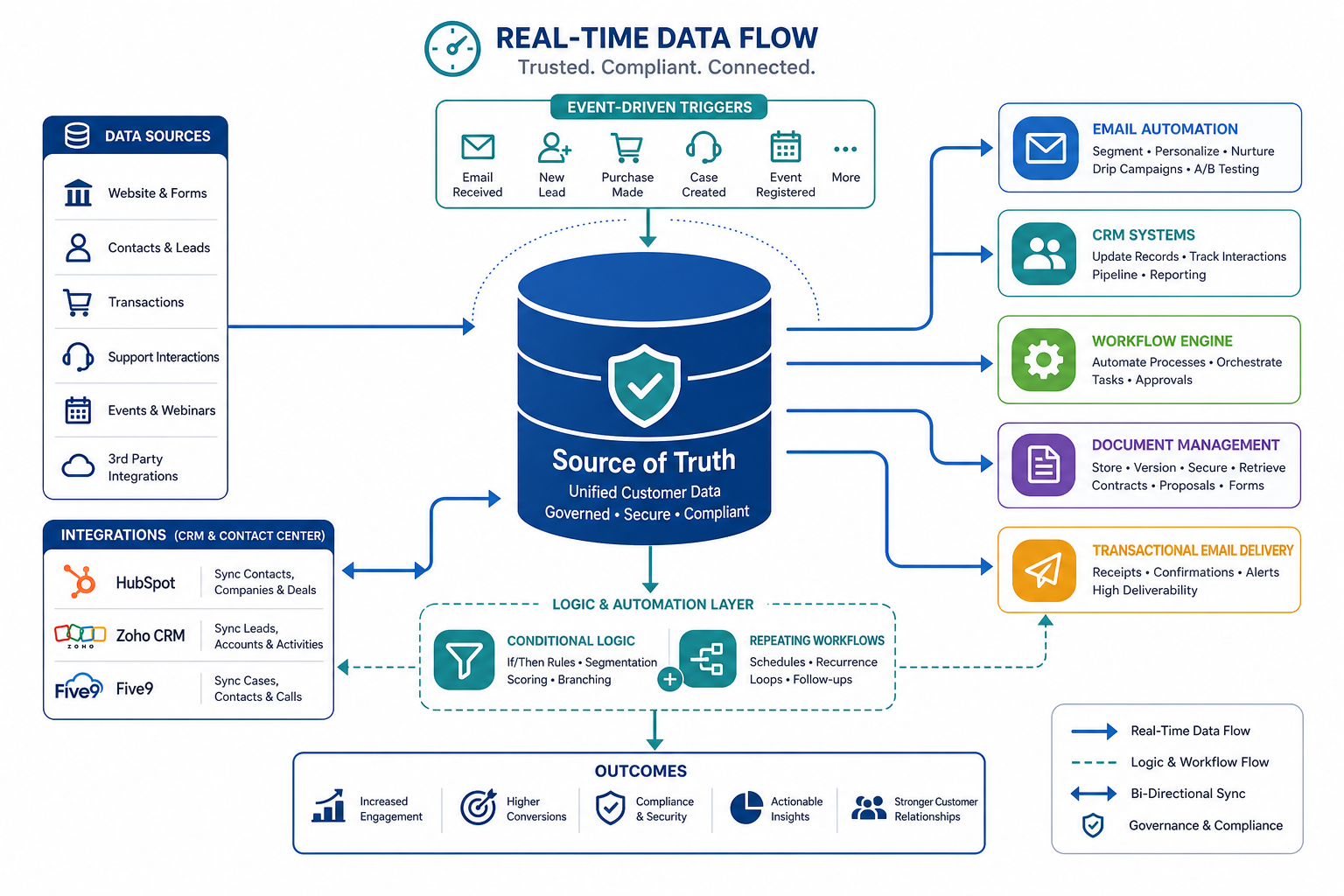
One principle governed every tool selection and integration decision in this build. The database is the source of truth. Not the email platform. Not a CRM. The internal database — where account status, document flags, product type, funding status, and client data actually live — is the system that drives everything.
This matters because it determines the integration direction. Most email automation tools are designed to be the source of truth — you put your contacts in the tool and the tool manages their journey. That model does not work when the journey is driven by database events happening outside the email system entirely. A flag flipping from false to true in the database at 3pm should trigger an email at 3pm. Not when a nightly sync runs. Not when an ops team member remembers to update the contact record in the email tool. Now.
The architecture was therefore webhook-first. Events push from the database to the email system in real time. The email system listens, evaluates conditions, and executes. The ops team manages the logic inside the email tool's UI — triggers, timing, conditions, content — without touching the database or writing code.
SYSTEM ARCHITECTURE — EVENT-DRIVEN EMAIL
------------------------------------------------------------------
[Internal Database]
  |
  +-- Field update / flag change occurs
  |     → Account funded: funded_flag = true
  |     → Document signed: docs_signed = true
  |     → Account type assigned: account_type = "trust"
  |
  +-- Webhook fires to Automation Layer (real-time)
  |
[Automation Layer — Ops-Controlled Workflow Engine]
  |
  +-- Event received
  |     → Contact identified by email / account ID
  |     → Trigger conditions evaluated against incoming payload
  |
  +-- Workflow logic executed
  |     |-- Event-Based: fire immediately on field update
  |     |-- Time-Based: schedule for fixed date or relative delay
  |     |-- Conditional: branch on product type / missing actions / status
  |     |-- Repeating: loop every X days until condition met or max reached
  |
  +-- Email generated
  |     → Dynamic data injected from webhook payload
  |     → Template rendered by ops team (no code)
  |     → Attachment appended OR secure document link inserted
  |
[Email Delivery Layer]
  |
  +-- Transactional send (bypasses marketing unsubscribe)
  +-- Marketing send (respects unsubscribe — for non-critical comms)
  +-- CC logic applied (dynamic recipients by role / POC / category)
  +-- Delivery confirmed → status written back to database
The ops team never sees this flow. They see a workflow builder where they configure what triggers an email, what conditions filter which clients receive it, how long to wait, how many times to retry, and what the email says. Engineering built the integration once. Operations owns it from that point forward.
Four Trigger Types — Each One Solves a Different Problem
The operational email requirements broke into four distinct trigger patterns. Each one appeared in the brief as a separate problem. Each one maps to a specific workflow configuration in the new system.
Trigger A: Event-Based — Database Field Updates
The most time-sensitive trigger type. A field in the database changes — an account is funded, a document is signed, a status flag flips — and an email needs to fire immediately. Not on a schedule. Not when someone remembers to trigger it manually. On the event.
The implementation: every relevant database update fires a webhook to the automation layer with the full updated record as the payload. The workflow engine receives the event, evaluates whether the incoming data matches the trigger conditions configured by the ops team, and fires the email if conditions are met. The ops team defines which field changes matter, what conditions apply, and what email sends. Engineering defined the webhook once.
Trigger B: Time-Based — Fixed Dates and Relative Delays
Tax season communications are the primary use case here. A set of emails needs to go out on specific calendar dates — October 1, December 10, January 15 — to every client in a defined segment. Others need to fire a fixed number of hours or days after a specific event: 48 hours after account opening, 7 days after funding, 30 days before a tax deadline.
Time-based triggers also carry a specific requirement that HubSpot could not handle: reminders that stop when a reply comes in, or when a maximum number of sends is reached. A reminder for an outstanding document submission needs to stop the moment the client responds — not continue firing because the sequence was built as five individual scheduled emails.
The implementation uses scheduled workflow execution for fixed-date sends and delay nodes for relative timing. The reply-based stop condition is handled by an inbound email listener that updates a reply_received flag in the database, which the automation layer monitors as a stop condition on the repeating sequence.
Trigger C: Conditional Logic — Segment on Database Fields
Not every client receives every email. Product type, funding status, document completion state, and account characteristics all determine which email a client should receive and when. In the previous system, this segmentation had to be rebuilt manually every time a campaign ran. In the new system, it lives inside the workflow conditions and updates automatically as the underlying database fields change.
| Condition | What it filters | Email behaviour |
|---|---|---|
| Product Type | Trust account vs standard vs joint. Each product type has different documentation requirements, different compliance timelines, and different onboarding sequences. | Workflow branches at product type. Each branch has its own template set managed independently by the ops team. |
| Trust Not Funded | Account opened, trust document signed, but funding transfer not yet completed. | Triggers the repeating reminder sequence. Runs until funded_flag = true or maximum reminder count reached. |
| Documents Not Shared | Onboarding step requires a document submission. docs_submitted_flag = false past the expected deadline. | Escalating reminder sequence begins. First reminder is informational. Subsequent reminders reference the outstanding item and the deadline explicitly. |
| Form Not Submitted | A required form completion is tracked as a database flag. Flag remains false past the expected submission window. | Workflow evaluates the flag on a schedule. If still false after the delay period, the reminder sequence fires. Stops on flag update or reply. |
Trigger D: Repeating Logic — Until the Condition Is Met
This was the trigger type HubSpot could not support at all — and the one that was creating the most manual work before the new system was built. The requirement: send a reminder every three days until the client takes a specific action. Stop when a database flag updates or when a reply is received. Apply a maximum send count so the system does not chase a client indefinitely.
This is not a sequence of individually scheduled emails. It is a loop with a stop condition. Those are architecturally different. A sequence fires regardless of what happens between sends. A loop checks its stop condition before each iteration and halts when the condition is met.
REPEATING LOGIC FLOW
------------------------------------------------------------------
Trigger condition met (e.g., account opened, transfer not completed)
  |
  +-- Send Reminder #1
  |     Wait X days
  |     Check stop conditions:
  |       → funded_flag = true? STOP
  |       → reply_received = true? STOP
  |       → send_count ≥ max? STOP
  |     All clear → continue
  |
  +-- Send Reminder #2
  |     Wait X days
  |     Check stop conditions (same logic)
  |     All clear → continue
  |
  +-- Send Reminder #N (max defined by ops team)
        If max reached with no action:
          → Escalate to internal POC
          → Log status for ops review
          → Exit loop
The ops team defines the interval, the maximum count, the stop conditions, and the escalation action. All of it is configurable in the workflow builder UI. Changing the reminder interval from three days to five days is a field edit. It does not require a code change or an engineering ticket.
Transactional vs Marketing — The Separation That Matters
The unsubscribe problem was the most consequential limitation in the old system. A client who clicked unsubscribe on a promotional email would not receive their tax documents. That is not a deliverability problem. That is a compliance problem — and potentially a legal one depending on the nature of the documents involved.
The solution is architectural. Two sending categories. Strict separation. Different rules for each.
| Category | What it covers | Unsubscribe rule | Examples |
|---|---|---|---|
| Transactional / Operational | Emails that are a direct consequence of a client's account, actions, or legal obligations. The client has a reasonable expectation of receiving these regardless of marketing preferences. | Not blocked by marketing unsubscribe. Client can still opt out of this category through a separate explicit preference, but standard marketing unsubscribe does not apply. | Tax documents. Account confirmations. Trust document delivery. Funding confirmations. Required action reminders. Account statements. |
| Marketing / Promotional | Emails sent to promote products, share content, or communicate non-operational information. No contractual or compliance obligation to deliver. | Fully respects unsubscribe. A client who has opted out of marketing communications does not receive these under any circumstances. | Product announcements. Newsletter content. Referral programmes. Promotional offers. |
The ops team tags each email workflow at creation with its sending category. The email delivery layer routes accordingly. The categorisation is visible in the workflow builder and auditable — which matters when a client disputes whether a communication was properly classified. The compliance record lives in the system, not in someone's memory of how the workflow was set up.
Documents — Attachments and Secure Links
The attachment requirement split into two categories immediately. Non-sensitive documents — account summaries, general onboarding materials, standard reports — can be attached directly to the email. Sensitive documents — trust instruments, tax documents, identity-related files — should never travel as email attachments. They need to be delivered through a secure, access-controlled channel with an audit trail.
The implementation for non-sensitive attachments: the automation layer generates or retrieves the file and attaches it directly to the outbound email. No manual intervention required. The file is generated or fetched at send time based on the client data in the webhook payload.
The implementation for sensitive documents: a secure hosted link is generated at send time and inserted into the email body. The link points to a document portal where the client authenticates before accessing the file. The access event is logged — who accessed it, when, and from which IP. The email delivery layer never carries the document itself. It carries the authenticated access path.
Both approaches are configurable per workflow in the ops team's UI. The ops team does not need to understand the technical difference between the two delivery methods. They configure which document delivery approach applies to a given workflow, and the system handles the rest.
Ops Ownership — What Zero Engineering Involvement Actually Means
The most important requirement in the brief was also the one most likely to be undermined by a bad architecture decision: the ops team must be able to run this system without engineering. Not "with minimal engineering support." Without. After the initial build, the engineering team should be completely out of the loop on email automation unless the ops team wants to add a brand new integration.
This requirement has specific implications. Every part of the system that the ops team touches has to be configurable through a UI — not a database, not a JSON config file, not a Slack message to a developer asking them to adjust a trigger condition.
| What ops needs to change | How they change it | Engineering involvement |
|---|---|---|
| Email content and subject line | Template editor in the workflow tool UI. Rich text. Dynamic tokens for personalisation. Preview before publish. | None. |
| Trigger condition | Workflow builder UI. Change the field being monitored, the value it needs to equal, or the combination of conditions required. | None. The webhook integration passes the full record — ops configures which fields in that record matter. |
| Timing delay | Delay node configuration in the workflow builder. Change 48 hours to 72 hours by editing the delay value. | None. |
| Reminder frequency and max count | Loop configuration in the workflow builder. Interval and maximum iterations are both editable fields. | None. |
| Stop conditions for repeating sequences | Stop trigger configuration in the workflow builder. Select the database field whose update should halt the loop. | None. New stop conditions on existing fields require no code. New stop conditions on fields not yet in the webhook payload require a one-time engineering addition to the payload. |
| CC recipients and routing logic | Recipient configuration in the workflow. Add CC addresses statically or configure dynamic routing based on the POC field or email category from the database payload. | None for standard configuration. New dynamic routing logic based on new fields requires one-time engineering. |
| Dynamic data tokens in email body | Token insertion in the template editor. Every field in the webhook payload is available as a token. Ops inserts , , directly in the template. | None for existing payload fields. New fields require one-time engineering addition to the webhook payload. |
The pattern is consistent: anything that changes the logic of existing workflows is ops-owned. Anything that requires a new field to exist in the webhook payload is a one-time engineering addition. Engineering built the integration. Operations runs the system. That boundary is designed, not accidental.
The Stack Recommendation
The tool selection was driven by the specific requirements that HubSpot could not meet. Each selection decision was tested against the three core constraints: transactional email without marketing unsubscribe interference, repeating conditional logic without engineering, and attachment or secure document delivery.
| Layer | Tool | Why this choice |
|---|---|---|
| Workflow Automation | Customer.io or Braze | Both support event-driven triggers via webhook, if/else branching, wait conditions, repeating logic with stop conditions, and a no-code workflow builder for ops teams. Customer.io is stronger for product and lifecycle email at scale with a lean ops team. Braze is better for higher-volume, multi-channel operations. Decision is driven by send volume and whether SMS or push channels are in scope. |
| Transactional Email Delivery | SendGrid or Postmark | Both are purpose-built transactional email infrastructure. Attachment support is native. Sending is completely independent of marketing unsubscribe status — the separation is architectural, not a configuration workaround. Postmark is faster and cleaner for strictly transactional sends. SendGrid is more flexible if the same platform needs to handle both transactional and marketing sends under separate IP pools. |
| Secure Document Delivery | DocSend, ShareFile, or custom portal | For sensitive documents, the email carries an authenticated link rather than an attachment. DocSend and ShareFile both support access-controlled document delivery with audit trails. A custom portal is appropriate if the client already has an authenticated client-facing web application that can serve documents. |
| Webhook Integration | Custom endpoint or Make.com | The database fires webhooks on field updates. A lightweight endpoint receives them and routes to the workflow engine. Make.com can handle this routing without custom code if the database supports webhook-out natively. A custom endpoint is appropriate if additional transformation or enrichment is needed before the payload reaches the workflow engine. |
The integration direction — database pushing to the email system via webhook rather than the email system polling the database — was the recommended approach on both performance and compliance grounds. Push events are real-time. A field update that flags a required tax document being ready needs to trigger an email within minutes, not at the next polling interval. And for compliance-sensitive communications, the timestamp on a triggered send needs to be accurate — which requires event-driven delivery, not batch polling.
Three Things Every Ops-Heavy Platform Learns the Hard Way
Every engagement like this surfaces the same patterns. Worth stating plainly for any product or fintech company trying to build operational email infrastructure on top of the wrong tool.
Marketing tools are not operations tools. This sounds obvious after the fact. Before the fact, it is easy to rationalise — HubSpot has workflows, HubSpot has sequences, HubSpot can send emails to contacts based on conditions. All of that is true. But the underlying assumption of a marketing platform is that you are sending communications at your discretion to an audience. An operations platform assumes the opposite — that the communication is triggered by something the client did or failed to do, and that the platform's job is to respond accurately and immediately to that event. Those are different design philosophies. A marketing tool retrofitted for operations work will always hit a ceiling.
Ops ownership requires architectural intention. "The ops team should be able to manage this without engineering" is a business requirement, not a default. Most automation platforms could theoretically be used by a non-technical ops team. In practice, they are configured by engineering, documented by no one, and become engineering-dependent within three months because the trigger logic lives in code that no one else can read. The only way to make ops ownership real is to design the system with the ops team's workflow as the primary user experience — and verify at every decision point that the configuration they will need to change lives in a UI, not a codebase.
The repeating logic gap is almost always the highest-cost manual process. Every fintech or product company that has outgrown HubSpot or a similar marketing tool has the same ticket in their backlog: "send reminder every X days until condition met." The ticket never gets prioritised because the manual workaround exists. The workaround is someone on the ops team running a database query, identifying clients with outstanding actions, and manually queuing individual sends. It works at ten clients. It breaks at a hundred. It is a liability at a thousand. The repeating logic implementation is not a nice-to-have. It is the automation that scales the ops function without scaling the ops headcount.
If Your Ops Team Is Still Manually Chasing Database Events
A marketing automation tool running workflows it was never designed for. An ops team sending manual reminders because the platform cannot loop. Tax documents and trust communications blocked by unsubscribe rules that were never meant to apply to them. Engineering on the hook for every trigger change, every new condition, every adjustment to a reminder cadence that should take thirty seconds to configure.
This is not a workflow problem. It is an architecture problem. The right system for operational email looks nothing like the right system for marketing email — and trying to make one do both's job produces exactly the limitations described in this post.
I design event-driven email automation systems for product companies, fintechs, and ops-heavy platforms that have outgrown their marketing tool and need a system that responds to their database, not the other way around. The engagement starts with an architecture sprint: a written system design, tool recommendation, integration map, and trigger logic specification before anything is configured or built.
Book an Email Architecture Session
30 minutes. We map your current email stack, your trigger requirements, your ops team's workflow, and where the platform is breaking down. You walk away with a plain-English architecture recommendation — whether or not you engage us to build it.