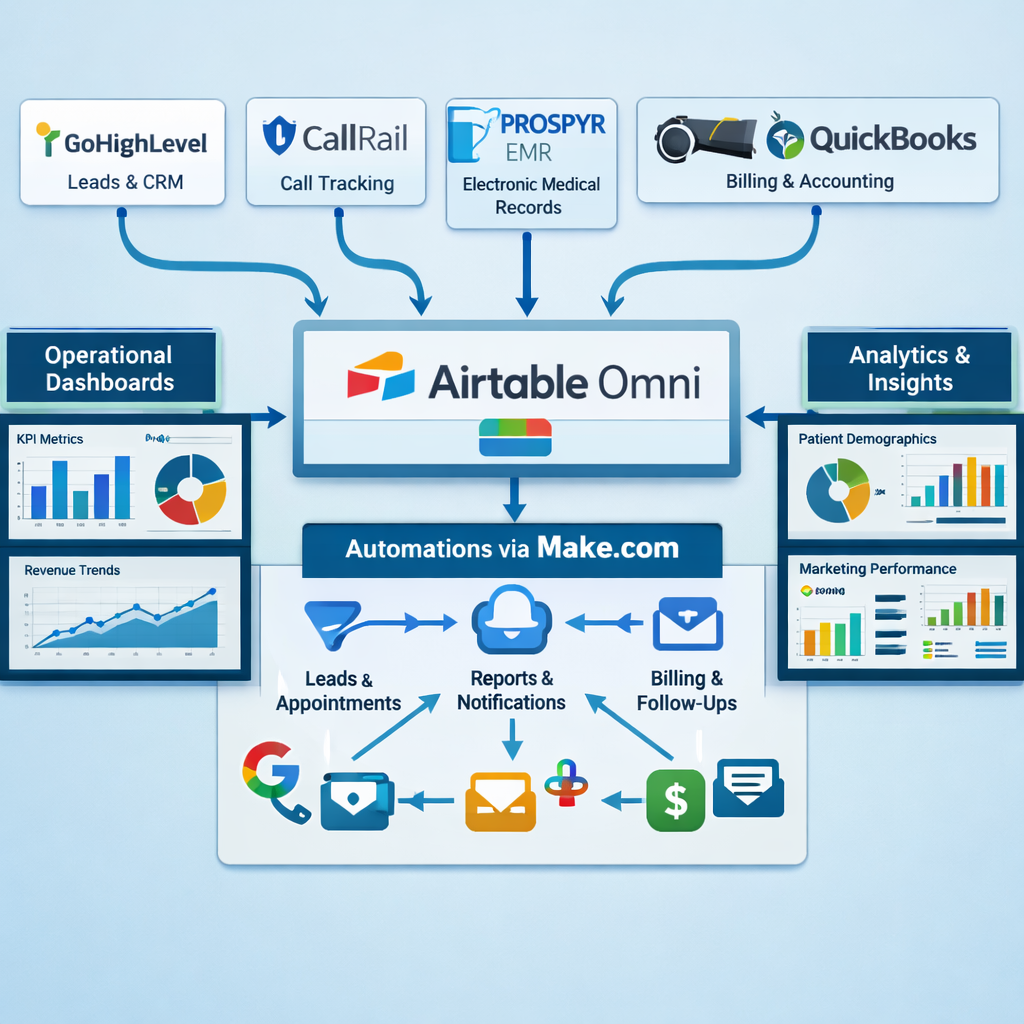
A cosmetic surgery practice in Las Vegas generates data from more touchpoints simultaneously than almost any other medical business model: website inquiries, Instagram DMs, CallRail phone calls, AI consultation chatbot sessions, coordinator follow-up activities, procedure bookings, pre-op appointments, financing applications, surgery days, post-op visits, before-and-after image capture, review requests, and QuickBooks revenue records. Each touchpoint lives in a different platform. None of them talk to each other by default. The practice owner sees twelve different logins every morning and still cannot answer the most basic operational question: "Which marketing channel produced the surgery patients we booked this month, and how profitable were each of those procedures?"
That is not a software problem. It is an architecture problem. The platforms are all capable. The data exists. The issue is that nobody has designed the connective tissue — the data model, the automation logic, and the intelligence layer — that turns eleven disconnected platforms into one operational brain.
This is the full architecture for that build. A cosmetic surgery and aesthetics practice ecosystem connecting Airtable, Make.com, GoHighLevel, CallRail, QuickBooks, PROSPYR EMR, Recura AI, Evoto, website consultation funnels, financing workflows, and before/after image organization into a centralized, HIPAA-aware, operationally intelligent system. No generic overviews. No platform feature lists. The actual data model, the actual workflow architecture, the actual Make.com scenario map, and the actual dashboard logic — built for a Las Vegas cosmetic surgery practice specializing in body contouring, tummy tuck, liposuction, mommy makeover, breast surgery, gynecomastia, medspa procedures, and energy-based treatments.
Architecture Philosophy: One Source of Truth, Not Eleven
The core architectural decision that everything else depends on: Airtable is the system of record. Every other platform is a data producer or data consumer. GoHighLevel produces lead and communication data. CallRail produces call attribution data. QuickBooks produces revenue and profitability data. PROSPYR produces clinical procedure data. Recura AI produces consultation interaction data. All of it flows into Airtable. Dashboards read from Airtable. Automations trigger from Airtable. Reports are built from Airtable.
This is not the same as saying Airtable replaces any of those platforms. GoHighLevel remains the CRM and communication engine — it just also syncs its data to Airtable. PROSPYR remains the EMR — it just pushes procedure confirmation data to Airtable via webhook. The principle is that no intelligence layer (dashboard, report, coordinator notification, profitability analysis) ever reads from multiple source platforms simultaneously. It reads from Airtable, which already has the aggregated data from all platforms.
This architecture has two operational benefits that compound over time. First, adding a new platform integration does not require rebuilding any dashboard or report — you add a new Make.com scenario that writes the new platform's data into Airtable in the correct format, and every existing dashboard that uses that data type automatically benefits. Second, when any individual platform has downtime or changes its API, only one Make.com scenario breaks — not the entire operational system.
OPERATIONAL INTELLIGENCE SYSTEM — HIGH-LEVEL ARCHITECTURE
──────────────────────────────────────────────────────────────────

DATA PRODUCERS (Inbound to Airtable)
┌──────────────┐  ┌──────────────┐  ┌──────────────┐  ┌──────────────┐
│  GoHighLevel │  │   CallRail   │  │  PROSPYR EMR │  │  QuickBooks  │
│  (Leads,     │  │  (Calls,     │  │  (Procedures,│  │  (Revenue,   │
│  Pipeline,   │  │  Attribution)│  │  Bookings,   │  │  Invoices,   │
│  Comms)      │  │              │  │  Clinical)   │  │  Payments)   │
└──────┬───────┘  └──────┬───────┘  └──────┬───────┘  └──────┬───────┘
       │                 │                 │                  │
       └─────────────────┴─────────────────┴──────────────────┘
                                  │
                            Make.com
                         (Orchestration Layer)
                                  │
                                  ▼
              ┌───────────────────────────────────────┐
              │           AIRTABLE OMNI               │
              │     (Centralized System of Record)    │
              │                                       │
              │  Leads Base │ Procedures Base         │
              │  Revenue Base │ Marketing Base        │
              │  Coordinator Base │ Clinical Base     │
              └───────────────────────────────────────┘
                                  │
                    ┌─────────────┼─────────────┐
                    ▼             ▼             ▼
             Dashboards    Automations    AI Workflows
             (Intelligence  (Coordinator  (Recura AI,
              Layer)         Alerts,       Evoto,
                             Follow-ups)   Notifications)

DATA CONSUMERS (Outbound from Airtable)
┌──────────────┐  ┌──────────────┐  ┌──────────────┐  ┌──────────────┐
│  Coordinator │  │  Marketing   │  │  Financing   │  │  Practice    │
│  Dashboards  │  │  Attribution │  │  Routing     │  │  Owner       │
│              │  │  Reports     │  │  (Cherry /   │  │  KPI View    │
│              │  │              │  │  Alphaeon /  │  │              │
│              │  │              │  │  CareCredit) │  │              │
└──────────────┘  └──────────────┘  └──────────────┘  └──────────────┘
The Airtable Database Architecture — Six Bases, One Ecosystem
Airtable Omni organizes data into Bases (databases) and Tables (like spreadsheet tabs within each database). The cosmetic surgery ecosystem requires six interconnected Bases. Each Base is purpose-built for a specific operational domain, and linked records across Bases create the relational layer that makes the intelligence dashboards possible.
Base 1: Lead Intelligence Base
The central intake point for all new leads entering the practice system. Every lead — regardless of source channel — creates a record here via Make.com. This is the base that answers: "Where are our leads coming from, which ones convert, and at what value?"
LEAD INTELLIGENCE BASE — TABLE STRUCTURE
──────────────────────────────────────────────────────────────────

TABLE: Leads (Primary)
  Fields:
  • Lead ID (Autonumber — unique identifier)
  • First Name, Last Name (Text)
  • Email, Phone (Text)
  • Lead Source (Single Select):
    Google Ads / Meta Ads / Instagram Organic / Website Organic /
    CallRail Inbound / Referral / Evoto AI / Recura AI Chat /
    Walk-In / Other
  • Lead Source Campaign (Text — UTM campaign name)
  • Lead Source Ad ID (Text — Meta Ad ID or Google Ad ID)
  • Procedure Interest (Multiple Select):
    Tummy Tuck / Liposuction / Mommy Makeover / Breast Aug /
    Breast Lift / Gynecomastia / BBL / Body Contouring /
    Medspa / Skin Tightening / Other
  • Lead Date (Date — auto-set by Make.com on creation)
  • Lead Stage (Single Select — mirrors GHL pipeline):
    New Inquiry / Consultation Scheduled / Consultation Held /
    Quoted / Financing Applied / Surgery Booked / Pre-Op /
    Surgery Complete / Post-Op / Lost / Converted
  • GHL Contact ID (Text — link back to GHL record)
  • Coordinator Assigned (Linked → Coordinators Table)
  • Consultation Date (Date)
  • Consultation Outcome (Single Select):
    Booked / Not Ready / Price Objection / Chose Competitor /
    Medical Disqualification / No Response
  • Quote Amount (Currency)
  • Financing Route (Single Select): Self-Pay / Cherry / Alphaeon / CareCredit
  • Financing Approved (Checkbox)
  • Surgery Revenue (Currency — linked from Procedures Base)
  • Days Lead to Surgery (Formula: Surgery Date - Lead Date)
  • Notes (Long Text)
  • CallRail Session ID (Text — for call attribution linking)

TABLE: CallRail Calls (Linked to Leads)
  • Call Date, Duration, Recording URL
  • Caller Phone, Caller City
  • Campaign Name (from CallRail attribution)
  • Keyword (paid search keyword that triggered the call)
  • Lead Created? (Checkbox — did this call create a new lead record?)
  • Linked Lead (Linked → Leads table by phone match)

TABLE: Consultation Notes (Linked to Leads)
  • Consultation Date
  • Coordinator (Linked → Coordinators table)
  • Procedures Discussed (Multiple Select)
  • Quote Presented (Currency)
  • Patient Questions/Concerns (Long Text — non-PHI summary only)
  • Follow-Up Actions (Long Text)
  • Consultation Outcome (Single Select)
Base 2: Procedure & Revenue Base
The financial intelligence layer. Every booked surgery and medspa procedure creates a record here — linked to the lead record it came from. This base answers: "Which procedures are most profitable, which coordinators close the most surgeries, and what is the ROI on each marketing channel when measured against actual surgery revenue?"
PROCEDURE & REVENUE BASE — TABLE STRUCTURE
──────────────────────────────────────────────────────────────────

TABLE: Procedures (Primary)
  Fields:
  • Procedure ID (Autonumber)
  • Patient (Linked → Leads Base → Leads table)
  • Procedure Type (Single Select):
    Tummy Tuck / Liposuction / Full Abdominoplasty / Mommy Makeover /
    Breast Augmentation / Breast Lift / Gynecomastia /
    BBL / 360 Lipo / Body Contouring Package / Medspa Treatment /
    Skin Tightening / RF Microneedling / Other
  • Procedure Date (Date)
  • Surgeon (Single Select — anonymized for dashboard)
  • Facility (Single Select: Office OR / Surgical Center / Hospital)
  • Procedure Revenue (Currency — total charged)
  • COGS — Surgeon Fee (Currency)
  • COGS — Facility Fee (Currency)
  • COGS — Anesthesia (Currency)
  • COGS — Implants/Supplies (Currency)
  • Gross Margin (Formula: Revenue - Sum of COGS fields)
  • Gross Margin % (Formula: Gross Margin / Revenue)
  • Payment Method (Single Select): Self-Pay / Cherry / Alphaeon /
    CareCredit / Insurance / Other
  • Financing Amount (Currency — if financed)
  • QuickBooks Invoice ID (Text — linked to QB record)
  • QuickBooks Payment Status (Single Select): Unpaid / Partial / Paid
  • PROSPYR Procedure ID (Text — links to EMR record)
  • Before/After Set ID (Linked → Media Base)
  • Coordinator (Linked → Coordinators Base)
  • Lead Source (Lookup from linked Lead record)

TABLE: Revenue Summary (Rollup View)
  • Monthly Revenue Rollup (Rollup from Procedures table)
  • Revenue by Procedure Type (Group by Procedure Type)
  • Revenue by Lead Source (Lookup + Rollup chain)
  • Average Procedure Value by Type
  • Margin by Procedure Type
Base 3: Marketing Attribution Base
The ROI accountability layer. Marketing spend by channel, linked to leads generated, linked to consultations held, linked to surgeries booked, linked to revenue collected. The full attribution chain — from ad dollar to surgery dollar — in one place.
MARKETING ATTRIBUTION BASE
──────────────────────────────────────────────────────────────────

TABLE: Ad Spend (manually updated or API-fed from Meta/Google)
  • Week / Month (Date)
  • Platform (Google Ads / Meta Ads / Instagram / SEO / Other)
  • Campaign Name
  • Ad Spend (Currency)
  • Impressions, Clicks (Number) — from platform API
  • CPL Target (Currency — manually set)

TABLE: Attribution Summary (Linked/Rollup)
  • Channel
  • Total Ad Spend (Linked from Ad Spend table)
  • Total Leads (Rollup from Leads Base — count by lead_source)
  • CPL Actual (Formula: Spend / Leads)
  • Consultations Held (Rollup — count consultations by source)
  • Cost Per Consultation (Formula)
  • Surgeries Booked (Rollup from Procedures Base via Lead Source lookup)
  • Total Revenue from Channel (Rollup from Procedures Base)
  • Marketing ROI (Formula: Revenue / Spend)
  • Target vs Actual CPL (Comparison field)
Base 4: Coordinator Performance Base
COORDINATOR PERFORMANCE BASE
──────────────────────────────────────────────────────────────────

TABLE: Coordinators
  • Coordinator Name
  • Role (Lead Coordinator / Post-Op Coordinator / Medspa Coordinator)
  • Active (Checkbox)
  • Leads Assigned (Rollup from Leads Base)
  • Consultations Scheduled (Rollup)
  • Consultations Held (Rollup)
  • Surgeries Booked (Rollup)
  • Consultation → Surgery Conversion Rate (Formula)
  • Average Time Lead to Consultation (Average rollup)
  • Quotes Presented (Rollup — count of Consultation records)
  • Financing Conversions (Rollup — count where Financing Approved = true)
  • Total Revenue Attributed (Rollup from Procedures Base)

TABLE: Coordinator Activity Log
  • Date, Time
  • Coordinator (Linked)
  • Activity Type (Call / Email / SMS / Consultation / Follow-Up)
  • Lead (Linked → Leads Base)
  • Outcome (Booked / No Answer / Callback Scheduled / Lost)
  • Notes
Base 5: Media & Before/After Base
Cosmetic surgery practices live and die by their before/after photo library. This base organizes patient media assets with procedure linkage, consent tracking, and usage approval — without storing the images in Airtable itself (images are stored in a HIPAA-compliant cloud storage like AWS S3 or Google Drive with restricted access; Airtable stores the metadata and links).
MEDIA & BEFORE/AFTER BASE
──────────────────────────────────────────────────────────────────

TABLE: Media Sets
  • Set ID (Autonumber)
  • Patient Reference (anonymized ID — not patient name)
  • Procedure Type (Single Select)
  • Procedure Date (Date)
  • Before Image URL (URL — links to S3/Drive, restricted access)
  • After Image URL (URL — same storage)
  • Image Capture Date (Date)
  • Evoto AI Processed (Checkbox — has image been through Evoto?)
  • Evoto Output URL (URL — processed/enhanced image link)
  • Consent for Marketing Use (Checkbox — SIGNED consent required)
  • Consent Document URL (URL — signed consent form in storage)
  • Approved for Website (Checkbox)
  • Approved for Social (Checkbox)
  • Approved for Paid Ads (Checkbox)
  • Linked Procedure (Linked → Procedures Base)
  • Notes
Base 6: Operations & Clinical Context Base
OPERATIONS BASE
──────────────────────────────────────────────────────────────────

TABLE: Surgery Schedule
  • Surgery Date
  • Patient Reference (anonymized)
  • Procedure (Linked → Procedures Base)
  • OR Block Time (Start/End)
  • Pre-Op Complete (Checkbox)
  • Medical Clearance Received (Checkbox)
  • Financing Confirmed (Checkbox)
  • Pre-Op Package Sent (Checkbox)
  • Post-Op Follow-Up Scheduled (Checkbox)
  • PROSPYR Case Number (Text — links to EMR)

TABLE: Pre/Post Op Checklist
  • Patient Reference
  • Linked Surgery Record
  • Labs Ordered (Checkbox)
  • Labs Received (Checkbox)
  • Medical Clearance (Checkbox)
  • Pre-Op Instructions Sent (Checkbox)
  • Post-Op Day 1 Call (Checkbox)
  • Post-Op Day 7 Visit (Checkbox)
  • Post-Op Photo Captured (Checkbox)
The Make.com Automation Architecture — 12 Core Scenarios
Make.com is the orchestration layer. It does not store data — it moves data between platforms and into Airtable in real time. Each scenario is a named, documented automation with a specific trigger, a specific data payload, and a specific set of Airtable write operations. Twelve scenarios cover the full operational scope of this practice ecosystem.
| Scenario # | Name | Trigger | Actions | Platforms |
|---|---|---|---|---|
| S-01 | Website Lead → Airtable + GHL | Website form submission (WordPress/Elementor webhook) | Create Lead record in Airtable Lead Base. Create/update contact in GHL. Set Lead Source from UTM parameters. Apply source tag in GHL. Create GHL Deal. Notify assigned coordinator via GHL internal notification. | WordPress → Make → Airtable + GHL |
| S-02 | Social Media Lead → Airtable + GHL | GHL Facebook Lead Ad form submission webhook | Same as S-01 but with lead_source = Meta Ads. Map ad_id from Meta payload to airtable field for ad-level attribution. | Meta → GHL → Make → Airtable |
| S-03 | CallRail Call → Airtable Attribution Update | CallRail webhook — new call event (answered or missed) | Search Airtable Leads for matching phone number. If found: update Lead record with call data (date, duration, campaign, keyword). If not found: create new Lead record with source = CallRail Inbound. Update GHL contact with call note via GHL API. | CallRail → Make → Airtable + GHL |
| S-04 | Recura AI Consultation → Lead Stage Update | Recura AI webhook — consultation session completed | Match session to existing Lead record by email/phone. Update Lead Stage in Airtable. Write Recura session summary to Consultation Notes table. If no existing lead: create new record with source = Recura AI. Update GHL pipeline stage to "Consultation Held." | Recura AI → Make → Airtable + GHL |
| S-05 | GHL Pipeline Stage Change → Airtable Sync | GHL webhook — Deal stage updated by coordinator | Find matching Lead record in Airtable by GHL Contact ID. Update Lead Stage field to match GHL deal stage. If stage = Surgery Booked: trigger S-08 (Pre-Op checklist creation). Log coordinator activity in Coordinator Activity Log table. | GHL → Make → Airtable |
| S-06 | PROSPYR Procedure Confirmed → Revenue Base Update | PROSPYR webhook — procedure booking confirmed | Create Procedure record in Airtable Revenue Base. Link to Lead record via patient reference. Set Procedure Type, Date, PROSPYR Case Number. Set Gross Margin fields (COGS sourced from Airtable procedure cost table). Update Lead Stage to Surgery Booked. | PROSPYR → Make → Airtable |
| S-07 | QuickBooks Invoice → Revenue Base Sync | QuickBooks webhook — invoice created or payment received | Match QuickBooks invoice to Procedure record by patient name/date. Update QuickBooks Invoice ID and Payment Status fields. If payment = received: update Procedure Revenue field. Trigger profitability recalculation in Airtable (via formula fields, auto-updates). | QuickBooks → Make → Airtable |
| S-08 | Surgery Booked → Pre-Op Checklist Creation | Triggered by S-05 (when stage = Surgery Booked) | Create Pre-Op Checklist record in Operations Base. Assign coordinator. Create GHL tasks for each checklist item with due dates relative to surgery date. Send pre-op information package to patient via GHL email sequence. Notify surgeon's calendar coordinator. | Make → Airtable + GHL |
| S-09 | Financing Application → Route + Update | GHL form submission — financing interest form | Evaluate patient quote amount + procedure type against financing thresholds. Route: Under $3K → Cherry. $3K–$15K → Alphaeon or CareCredit (branch by credit score indicator if available). Over $15K → CareCredit first, Alphaeon second. Update Financing Route field in Airtable. Send patient the appropriate financing application link via GHL SMS. Create coordinator follow-up task in GHL. | GHL → Make → Airtable + GHL (SMS send) |
| S-10 | Evoto Image Processing → Media Base Update | Manual trigger (batch run) OR Evoto webhook on completion | For each completed Evoto image processing job: update Media Set record in Airtable with Evoto Output URL. Set Evoto AI Processed = true. If consent fields are complete: set Approved for Social/Website based on consent scope. Notify marketing coordinator that new approved before/after sets are ready. | Evoto → Make → Airtable |
| S-11 | Post-Op Day 1 — Automated Coordinator Alert | Scheduled — runs daily at 8am. Checks Operations Base for surgeries with Surgery Date = yesterday. | For each surgery from yesterday: create GHL task assigned to post-op coordinator "Day 1 check-in call." Send automated GHL SMS to patient: "Hi [name], the team at [practice] is thinking of you. How are you feeling? Reply anytime or call us at [phone]." Update Ops checklist: Post-Op Day 1 Call = Pending. Notify coordinator via GHL internal notification. | Make → Airtable (read) + GHL (task + SMS) |
| S-12 | Stale Lead Re-Engagement Alert | Scheduled — runs weekly. Checks Lead Base for leads with Stage = New Inquiry or Quoted and Lead Date older than 14 days with no activity. | For each stale lead: create GHL task for assigned coordinator "Stale lead — re-engage." Add tag stale_lead in GHL. Send coordinator Airtable notification with link to lead record. Update Airtable Lead record with Stale flag. If lead is 30+ days stale: escalate to practice manager notification. | Make → Airtable (read) + GHL (task + tag) |
The Full Lead Journey — Data Flow From First Touchpoint to Surgery Revenue
The power of this architecture is not in any individual scenario. It is in what happens when all scenarios run together for a single patient journey. This is the full data flow for a lead who comes in via a Meta Ad, goes through AI consultation, books a surgery, finances it via Alphaeon, and whose before/after images get processed by Evoto and approved for marketing.
FULL PATIENT JOURNEY — DATA FLOW MAP
──────────────────────────────────────────────────────────────────

T+0: META AD CLICK
  Patient sees Instagram ad for mommy makeover.
  Clicks through to Elementor landing page.
  UTM parameters captured in URL:
  utm_source=instagram, utm_medium=paid_social,
  utm_campaign=mommy_makeover_summer, utm_content=before_after_video_v2

T+2 minutes: WEBSITE FORM SUBMISSION
  Patient submits 3-field form (name, phone, email + procedure interest).

  S-01 fires:
  → Lead record created in Airtable Lead Base
    (Lead Source = Meta Ads, Campaign = mommy_makeover_summer,
     Ad Content = before_after_video_v2, Procedure Interest = Mommy Makeover)
  → GHL contact created with same data
  → Source tags applied: source_meta_ads, source_campaign_mommy_summer
  → GHL Deal created: Stage = New Inquiry
  → Coordinator notification sent (GHL internal)
  → Welcome SMS sent to patient (GHL automation)

T+15 minutes: RECURA AI CONSULTATION
  Patient engages with Recura AI chatbot on website.
  AI asks qualification questions: procedure interest, timeline, budget range.
  Session completes with summary.

  S-04 fires:
  → Airtable Lead record updated: Stage = Consultation Held (AI)
  → Recura session summary written to Consultation Notes table
  → GHL pipeline stage updated to "AI Consulted"
  → Coordinator alerted: "Lead completed AI consultation — review summary"

T+2 hours: COORDINATOR OUTREACH
  Coordinator reviews Recura AI consultation summary in Airtable.
  Calls patient (via GHL click-to-call or direct).
  CallRail captures the call.

  S-03 fires on the call:
  → CallRail call record linked to Lead record in Airtable
  → Call duration, campaign attribution recorded
  → Coordinator logs outcome in GHL: "Consultation scheduled"

  S-05 fires on GHL stage change:
  → Airtable Lead Stage updated to "Consultation Scheduled"
  → Consultation Date populated in Lead record

T+5 days: IN-OFFICE CONSULTATION
  Patient attends consultation.
  Coordinator logs outcome in GHL: "Quoted — $18,500 Mommy Makeover Package"

  S-05 fires:
  → Airtable Lead Stage: Quoted
  → Quote Amount: $18,500 written to Lead record

  Financing route logic (S-09 trigger — coordinator submits financing form):
  → Quote amount = $18,500 → Threshold: >$15,000 → Route to CareCredit
  → Patient receives CareCredit application link via GHL SMS
  → Financing Route field in Airtable: CareCredit
  → Coordinator follow-up task created in GHL: "Follow up on CareCredit status — 2 days"

T+8 days: FINANCING APPROVED + SURGERY BOOKED
  Coordinator updates GHL: Financing Approved, Surgery Booked.
  PROSPYR procedure booking confirmed (webhook).

  S-06 fires (PROSPYR webhook):
  → Procedure record created in Airtable Revenue Base
    (Procedure Type: Mommy Makeover, Date: [surgery date], PROSPYR Case ID: xxx)
  → Linked to Lead record in Lead Base
  → COGS fields populated from Airtable procedure cost table

  S-05 fires (GHL stage change):
  → Lead Stage: Surgery Booked

  S-08 fires (triggered by S-05):
  → Pre-Op Checklist record created in Operations Base
  → GHL tasks created for coordinator:
    • Labs ordered (due: surgery date - 21 days)
    • Medical clearance received (due: surgery date - 14 days)
    • Pre-op instructions sent (due: surgery date - 7 days)
  → Pre-op email package sent to patient via GHL

T+0 (Surgery Day): PROCEDURE COMPLETE
  Surgeon marks procedure complete in PROSPYR.

  S-06 fires (status update):
  → Procedure record in Airtable: status = Complete
  → Lead Stage: Surgery Complete

T+1 day: POST-OP AUTOMATION
  S-11 fires (daily scheduled scenario at 8am):
  → Identifies surgery from yesterday
  → GHL SMS sent to patient: check-in message
  → Coordinator task created: Day 1 call
  → Operations checklist: Post-Op Day 1 Call = Pending

T+21 days: QUICKBOOKS INVOICE PAID
  Patient makes final payment in QuickBooks.

  S-07 fires (QuickBooks webhook):
  → Procedure record: QuickBooks Payment Status = Paid
  → Procedure Revenue: $18,500 confirmed
  → Gross Margin calculated automatically: $18,500 - COGS = [margin]
  → Marketing Attribution Base updated:
    Meta Ads / mommy_makeover_summer campaign:
    +1 Surgery, +$18,500 Revenue → ROI recalculated

T+30 days: BEFORE/AFTER CAPTURE + EVOTO PROCESSING
  Post-op coordinator captures before/after images.
  Uploads to cloud storage. Creates Media Set record in Airtable.
  Sends to Evoto for AI image processing.

  S-10 fires (Evoto completion webhook):
  → Media Set record: Evoto AI Processed = true
  → Evoto Output URL stored
  → If consent fields complete: Approved for Social = true
  → Marketing coordinator notified: "New mommy makeover before/after ready"

T+35 days: REVIEW REQUEST
  GHL automation (based on Post-Op Day 30 tag applied by S-11 chain):
  → Review request SMS sent to patient
  → Google Review link delivered
  → If review left: review_completed_google tag applied in GHL
    → Airtable Lead record: Review Left = Google
The Four Operational Intelligence Dashboards
All four dashboards live in Airtable and read from the six Bases. Each dashboard is an Airtable Interface — a purpose-built view that shows exactly what a specific role needs to see, with no access to data irrelevant to their function.
Dashboard 1: Practice Owner KPI View
The single-screen morning report that answers every practice owner question without opening any other platform. Updated automatically by Make.com scenarios throughout the day.
| Metric | Source | Update Frequency | Target/Benchmark |
|---|---|---|---|
| New Leads This Month | Rollup — Lead Base, created_date = current month | Real-time | Configurable per practice |
| Consultations Held This Month | Rollup — Lead Base, Stage = Consultation Held | Real-time | — |
| Lead → Consultation Rate | Formula: Consultations / Leads | Real-time | Industry avg: 25–40% |
| Consultation → Surgery Booked Rate | Formula: Surgery Booked / Consultations Held | Real-time | Industry avg: 40–60% |
| Surgeries This Month | Rollup — Procedures Base, procedure_date = current month | Real-time (PROSPYR sync) | — |
| Revenue This Month | Rollup — Procedures Base, payment_status = Paid | Real-time (QuickBooks sync) | Monthly target (configurable) |
| Revenue vs Target (% of monthly goal) | Formula: Revenue / Target | Real-time | 100% = on track |
| Gross Margin This Month | Rollup — Procedures Base, gross_margin field | Real-time | Practice-specific |
| Highest ROI Lead Source (MTD) | Attribution Base — Revenue / Spend by channel | Daily update | — |
| Financing Conversion Rate | Formula: Financing Approved / Financing Applied | Real-time | — |
| Surgeries Scheduled Next 30 Days | Operations Base — procedure_date in next 30 days | Real-time | — |
| Open Pre-Op Checklists (Incomplete) | Operations Base — checklist items incomplete | Real-time | 0 incomplete 7 days before surgery |
Dashboard 2: Coordinator Performance View
Each coordinator sees their own performance metrics plus an actionable task queue. No coordinator sees another coordinator's data unless they are a lead coordinator with manager-level access.
- My Active Leads — all leads assigned to this coordinator with current stage and days-in-stage
- My Consultations This Week — scheduled and completed
- My Surgery Bookings This Month — vs personal target
- Follow-Up Queue — leads requiring action today, sorted by priority (Surgery Booked checklists first, stale leads last)
- My Conversion Rate — personal consultation-to-surgery rate vs team average
- Financing Outcomes — how many of my leads applied for financing, how many were approved, which routes worked
Dashboard 3: Marketing Attribution View
The marketing team sees full-funnel performance by channel, campaign, and ad content. This is the dashboard that makes the conversation about ad spend accountable — not "we spent $8,000 on Meta this month" but "we spent $8,000 on Meta this month, generated 47 leads, 14 consultations, and 6 surgery bookings worth $89,500."
MARKETING ATTRIBUTION DASHBOARD STRUCTURE
──────────────────────────────────────────────────────────────────

ROW STRUCTURE (one row per channel per month):
  Channel | Spend | Leads | CPL | Consults | Cost/Consult |
  Surgeries | Revenue | ROI | Top Campaign | Best Ad

CHANNEL BREAKDOWN:
  Google Ads — Search
  Google Ads — Display/Remarketing
  Meta Ads — Instagram
  Meta Ads — Facebook
  Instagram Organic
  CallRail Inbound (SEO + Direct)
  Recura AI / Website Chat
  Referral
  Other

CAMPAIGN-LEVEL DRILL DOWN (click into any channel row):
  Campaign Name | Spend | Leads | Consultations | Surgeries | Revenue | ROAS

AD-LEVEL DRILL DOWN (click into any campaign):
  Ad Content ID | Leads | Procedure Interest | Surgeries | Revenue
Dashboard 4: Procedure Profitability View
The financial intelligence layer that most cosmetic surgery practices do not have. Not just revenue by procedure — margin by procedure, accounting for variable COGS, after factoring in the marketing cost to acquire each surgery type.
PROCEDURE PROFITABILITY VIEW
──────────────────────────────────────────────────────────────────

BY PROCEDURE TYPE (current month + trailing 12 months):
  Procedure | Count | Avg Revenue | Avg COGS | Avg Margin | Margin %

TRUE ACQUISITION COST PER PROCEDURE TYPE:
  Procedure | Surgeries | Lead Source Distribution | Avg Marketing Cost/Surgery

  Example: Mommy Makeover
    → 8 surgeries this month
    → Lead Sources: 5x Meta Ads, 2x Google, 1x Referral
    → Avg Meta CPL: $420 | Conversion: 12% lead-to-surgery
    → True Marketing Cost per Mommy Makeover surgery: ~$3,500
    → Avg Revenue: $18,500 | Avg COGS: $7,200 | Gross Margin: $11,300
    → Net Margin after marketing: $7,800 per surgery

FINANCING PROFITABILITY:
  Financing Route | % of Cases | Avg APR Cost (estimated) | Net Revenue Impact
The AI Layers — Recura AI and Evoto Integration
Recura AI — Website Consultation Funnel Architecture
Recura AI is a cosmetic surgery-specific AI consultation tool that qualifies website visitors, captures procedure interest, and provides preliminary information before a human coordinator engages. In this architecture, Recura AI is the top-of-funnel intelligence layer that converts anonymous website visitors into qualified lead records.
The integration with Airtable and GHL via Make.com (Scenario S-04) means every Recura AI session creates a structured lead record — not just an email capture. The session summary includes: procedure interests discussed, patient-reported budget range (if captured), patient-reported timeline, and any red-flag information (e.g., patient mentions a medical condition that may affect candidacy). The coordinator sees this summary before making the first phone call.
This changes the coordinator's first call from a cold qualification call to a warm continuation of a conversation the patient already started. The coordinator opens with: "I saw you were exploring mommy makeover options on our site last night — I wanted to answer any questions you had after looking through the information." That framing is only possible if Recura AI data flows into the coordinator's lead record in real time.
Evoto AI — Before/After Image Processing Workflow
Evoto is an AI image enhancement tool for medical aesthetics photography — it normalizes lighting, improves image quality, and creates consistent before/after presentation formats without altering the clinical accuracy of the images. For a cosmetic surgery practice, a library of professionally processed before/after images is a primary marketing asset.
The Evoto integration workflow:
- Image capture. Post-op coordinator captures before/after images at the 4-week or 6-week follow-up appointment. Images uploaded to HIPAA-compliant cloud storage (AWS S3 with access controls). Media Set record created in Airtable Media Base with patient reference (anonymized ID, not name), linked Procedure record, and raw image URLs.
- Consent verification. Before any image is sent to Evoto (or used for anything beyond clinical records), the Airtable record must show consent_for_marketing_use = true with a consent document URL. Make.com Scenario S-10 checks this condition before triggering Evoto processing. Images without confirmed consent are held in a pending queue and a task is created for the coordinator to obtain signed consent.
- Evoto processing. Once consent is confirmed, images are sent to Evoto for AI processing. Evoto returns enhanced versions to the designated output folder in cloud storage. S-10 fires on Evoto completion webhook: updates Airtable Media Set record with processed image URLs, sets Evoto_processed = true.
- Marketing approval routing. The Media Base record, once Evoto-processed and consent-confirmed, goes to a marketing coordinator review queue in Airtable. The coordinator reviews the image set and approves individually for: website gallery, social media posting, paid ad use. Each approval is a separate checkbox — a patient may consent to website use but not paid ads. This granularity is tracked in Airtable at the record level.
- Content calendar integration. Once approved for social use, a notification goes to the social media coordinator's Airtable queue: "New before/after set approved for [procedure type] — ready to schedule." The coordinator schedules the post and marks content_published = true in the Media record, closing the loop.
Financing Workflow — Cherry, Alphaeon, and CareCredit Routing Logic
Patient financing is one of the highest-leverage operational improvements available to a cosmetic surgery practice. The average cosmetic surgery patient who is told "we don't offer financing" and has to find their own solution converts at roughly half the rate of a patient who is offered a pre-qualified financing pathway in the same consultation. The routing logic determines which pathway each patient enters — and the wrong routing (sending a $25,000 procedure patient to Cherry, which caps at $10,000) wastes both the patient's time and the coordinator's.
FINANCING ROUTING LOGIC (Make.com Scenario S-09)
──────────────────────────────────────────────────────────────────

TRIGGER: Coordinator marks lead as "Financing Interest" in GHL
         OR patient selects "Payment Plan" on consultation form

INPUT VARIABLES:
  • Quote Amount (from Airtable Lead record)
  • Procedure Type (from same record)
  • Patient Location/State (for lender availability check)

ROUTING LOGIC:

  IF Quote Amount < $3,000:
    → Route: Cherry
    → Action: Send patient Cherry pre-qualification link via GHL SMS
    → Reason: Cherry specializes in smaller aesthetic procedures,
               faster approval, lower barrier to entry

  IF Quote Amount $3,000 – $10,000:
    → Route: Cherry FIRST (instant pre-qual), then Alphaeon if Cherry declines
    → Action: Send Cherry link immediately.
              If cherry_approved = false after 48h: trigger Alphaeon routing.
    → Update Airtable: Financing Route = Cherry → Alphaeon (fallback)

  IF Quote Amount $10,001 – $25,000:
    → Route: Alphaeon PRIMARY, CareCredit as parallel offer
    → Action: Send both Alphaeon and CareCredit links in same SMS/email.
              "Here are two financing options for your procedure —
               apply for both to see which works best for you."
    → Update Airtable: Financing Route = Alphaeon/CareCredit

  IF Quote Amount > $25,000:
    → Route: CareCredit PRIMARY (highest credit limits), Alphaeon secondary
    → Action: CareCredit link first. If declined: Alphaeon link.
    → Create coordinator task: "High-value financing case — call patient
       to walk through CareCredit application."
    → Update Airtable: Financing Route = CareCredit Priority

  IF Patient has prior financing history (previous record in Airtable):
    → Check prior approval platform from previous procedure record.
    → Route to same lender first — existing approval increases approval rate.

POST-APPLICATION TRACKING:
  → Coordinator updates Financing Approved checkbox in GHL when confirmed
  → S-05 fires: Airtable Financing Approved = true
  → Financing Amount populated
  → Dashboard: Financing Conversion Rate updates

FINANCING DECLINE HANDLING:
  → IF all routes decline: Create coordinator task "Financing declined —
     discuss payment plan options or extended deposit structure."
  → Update Lead record: Financing Status = Declined
  → Do NOT mark lead as Lost — payment plan alternatives exist
Implementation Phases and Timeline
This is a 6-month build. Not because the work is slow — because production-grade systems that connect EMRs, financial software, AI platforms, and marketing CRMs require careful testing at each integration layer before the next layer is added. A failure in the QuickBooks sync that corrupts revenue data is far more damaging than a three-week delay in the build. The phases are sequenced to make each layer testable before adding the next.
| Phase | Duration | Work | Output |
|---|---|---|---|
| Phase 1: Foundation | Weeks 1–3 | Airtable Bases 1–3 built (Leads, Procedures, Marketing). All custom fields and relationships defined. Tag taxonomy locked. GHL subaccount audit — confirm existing pipeline stages, custom fields, and workflows map to new architecture. Data migration plan for any existing GHL contacts. | Airtable architecture complete. GHL audit delivered. Data model locked before any automation is built. |
| Phase 2: Core Integrations | Weeks 3–6 | Make.com Scenarios S-01, S-02, S-03, S-05 built and tested (website leads, social leads, CallRail, GHL sync). GHL pipeline stage changes flowing into Airtable. New lead creation tested end-to-end with real form submissions. Coordinator workflow in GHL verified. | Lead intake fully automated. Every new lead from web and social creates Airtable + GHL records simultaneously. CallRail attribution live. |
| Phase 3: Revenue and Clinical | Weeks 6–10 | Make.com Scenarios S-06, S-07 built (PROSPYR + QuickBooks). Procedure records creating in Revenue Base. QuickBooks invoice sync tested. COGS fields populated. Profitability formulas validated against real procedure data. Airtable Bases 4–6 (Coordinator, Media, Operations) built. | Revenue Base live. First profitability dashboard queryable. Finance team can see QuickBooks data alongside procedure data without leaving Airtable. |
| Phase 4: AI Workflows | Weeks 10–14 | Recura AI integration (S-04) built. Evoto workflow (S-10) built. Before/after consent and approval workflow live. AI-driven coordinator notification scenarios (S-08, S-11, S-12) built and tested. Financing routing workflow (S-09) deployed. | All 12 Make.com scenarios live. Full patient journey automated from lead to post-op. Financing routing operational. |
| Phase 5: Intelligence Layer | Weeks 14–18 | All four Airtable dashboards built (Practice Owner KPI, Coordinator Performance, Marketing Attribution, Procedure Profitability). Airtable Interfaces configured per role (coordinator sees only their data, owner sees all). 30-day data validation period — verify every metric against source systems. | Dashboards live. Practice owner has single-view operational intelligence. Coordinator performance visible for first time. |
| Phase 6: Optimization + Documentation | Weeks 18–24 | System documentation (all scenarios, all field mappings, all workflow triggers). Staff training (coordinators, marketing team, practice manager). First-90-day data review — recalibrate any metrics that aren't reflecting reality. Identify Phase 2 improvements based on real operational data. | Fully documented system. Trained staff. Baseline operational data established. System handed over with maintenance SOP. |
"The cosmetic surgery practice that knows its true cost-per-surgery by channel — not just cost-per-lead — is playing a completely different game than its competitors. Marketing decisions, coordinator hiring, OR scheduling, and financing partnerships all change when the data actually connects." Arsalan Faysal — Revenue Systems Architect
The Scope Reality — What This Actually Costs to Build Correctly
The brief budgeted $30–$60/hour. At 6 months of ongoing engagement — even at 15–20 hours per week, which is conservative for this scope — that is 360–480 hours. At $30/hour: $10,800–$14,400. At $60/hour: $21,600–$28,800.
What the brief describes is a system that, once operational, gives the practice operational intelligence it currently has to pay a full-time operations manager to approximate manually. The before/after Evoto processing workflow alone, if done manually by a staff member, takes 4–6 hours per week. The stale lead re-engagement tracking that currently falls through the cracks represents lost revenue far greater than the system's build cost.
The correct framing for this engagement is not hourly rate. It is outcome value. A system that increases consultation-to-surgery conversion rate from 40% to 55% — by giving coordinators better data, faster follow-up automation, and financing routing that actually works — on a practice doing $2M in annual surgery revenue adds $300K in incremental annual revenue. That is the ROI case for this build. The hourly rate is a rounding error relative to that outcome.
The realistic market rate for an architect who can deliver all eleven platform integrations, the Airtable relational database design, the HIPAA-aware data flow architecture, the Make.com scenario set, and the operational intelligence dashboards is $85–$150/hour. The right engagement structure for a build of this scope is a fixed-price Phase 1 (foundation and core integrations — approximately $12,000–$18,000) followed by a monthly retainer for ongoing optimization, new scenario builds, and system maintenance ($2,500–$4,500/month). That structure aligns incentives correctly — the architect is motivated to build something that works and keeps working, not to maximize billable hours.
Final Thoughts: The Practice That Knows Its Numbers Wins
The cosmetic surgery practices that dominate their markets in the next five years will not be the ones with the most Instagram followers or the most Google Ads spend. They will be the ones that know, with precision, which acquisition channels produce the most profitable procedure mix, which coordinators convert consultations at the highest rate, which financing pathways close the most hesitant patients, and which procedure types deserve more OR capacity based on margin — not just volume.
None of that knowledge is possible without the architecture described in this post. Not because the platforms don't have the data — they all do. Because without a centralized system of record, a consistent automation layer, and intelligence dashboards that read from that single source, the data exists in eleven silos that nobody has time to manually reconcile.
The architecture described here is not a luxury for large practices. It is the operational foundation that allows a growing practice to scale without proportionally scaling its administrative overhead. Every coordinator hire, every new marketing channel, every new procedure offering becomes incrementally easier to manage when the system already knows how to capture, route, and report on those activities automatically.
Build the data architecture before the automations. Build the automations before the dashboards. Build the dashboards before making decisions about marketing spend, coordinator performance, or procedure mix. In that sequence, and only in that sequence, the investment compounds.